
An Expert Advisor (EA) is a piece of software specifically designed for the MetaTrader 4 (MT4) or MetaTrader 5 (MT5) platforms. In the simplest terms, an EA is a set of rules—written in a programming language called MQL—that monitors the markets and executes trades on your behalf.
While the retail world often calls them “Trading Robots,” a professional trader views an EA as an automated execution tool. It doesn’t have “hunches” or “feelings”; it simply follows the mathematical instructions you give it.
How Do EAs Actually Work?
EAs operate using “If/Then” logic. For example, a basic EA might be programmed with the following rule:
MQL4 vs MQL5: The Language of Automation Expert Advisors are built using the MetaQuotes Language (MQL). While MQL4 is the industry standard for the classic MT4 platform, MQL5 offers more advanced backtesting capabilities and faster execution on the MT5 platform. Note that an EA built for MT4 will not run on MT5 without being recoded.
- IF the 50-day Moving Average crosses above the 200-day Moving Average…
- THEN open a Buy order with a 1% risk and a 30-pip Stop Loss.
The software scans the price feed every time a new “tick” occurs. If the market conditions match your programmed rules exactly, the EA sends an order to your broker’s server instantly.
The Key Difference: Indicators vs. EAs
Many beginners confuse these two, but they serve very different purposes:
- Indicators: These are visual aids (like RSI or MACD) that help you analyze the market. They show you a signal, but they cannot place a trade.
- Expert Advisors: These are active participants. They use indicators to find setups, but they also have the authority to open, manage, and close trades without you being at the computer.
Why Use an EA?
- Emotionless Execution: A robot will never “revenge trade” or move a take-profit target out of greed.
- 24/5 Surveillance: Humans need sleep; code does not. An EA can monitor multiple currency pairs simultaneously, day or night.
- Speed: An EA can calculate position size and execute an order in milliseconds.
[PRO-TRADER INSIGHT] Why Most “Free” EAs Fail
Most beginners download a free EA and expect it to work forever. However, market conditions change. A robot designed for a Trending Market will often blow an account during a Ranging (Sideways) Market.
My advice is this: Never treat an EA as “set and forget.” You must understand the underlying strategy so you know when to turn the robot OFF.
Test Your Knowledge: The EA Basics Quiz
1. What is the primary difference between a Trading Indicator and an Expert Advisor?
- Answer: Indicators only analyze data, while EAs can actually execute trades.
2. What happens if your internet goes out while an EA is running on your home computer?
- Answer: The EA stops functioning until the connection is restored (Use a VPS to avoid this).
3. Why is “Set and Forget” a dangerous mindset for EAs?
- Answer: Because market regimes change (e.g., from trending to ranging).
Frequently Asked Questions (FAQ)
Do I need to know how to code to use an EA? No. While EAs are built using MQL, you can use them by simply adjusting the “Inputs” (settings) provided by the developer.
Can I use an EA on my mobile phone? Generally, no. Mobile MT4/MT5 apps do not support custom EAs. You need the desktop platform or a VPS.
Are Forex robots legal? Yes, automated trading is used by the world’s largest banks. Just ensure you use a regulated broker.
What a Real Trade Looks Like (MT4)
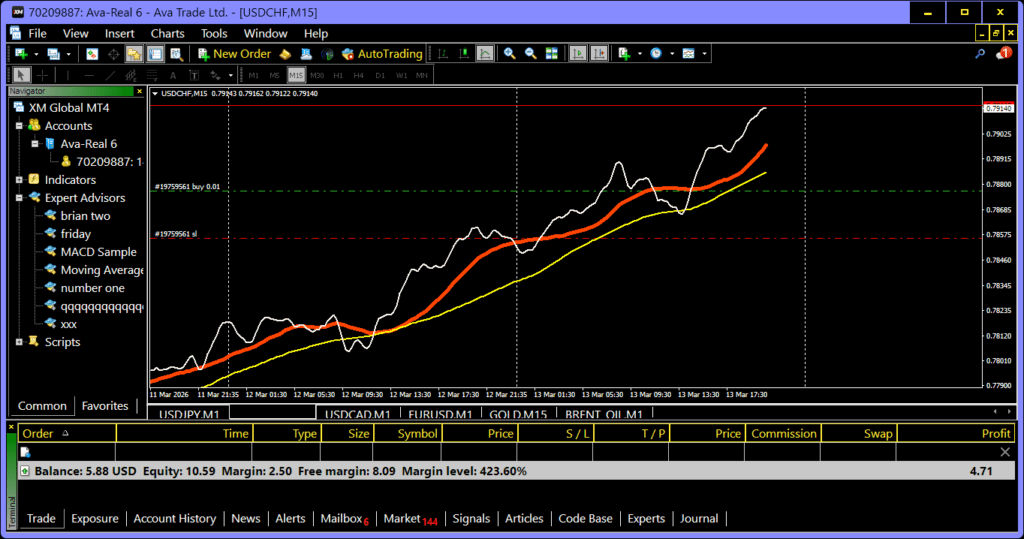
To move beyond the theory, I want to show you exactly how a live trade appears on a professional screen. Below is a screenshot from my own MetaTrader 4 terminal taken on a recent Friday.
Unlike the “perfect” marketing images you see elsewhere, this is a raw look at a live market environment. Notice the terminal window at the bottom—this is where you track your entry price, your current stop loss, and the real-time profit/loss (P/L). Seeing this “Terminal” in action is the first step toward understanding how an Expert Advisor manages a position once it is live in the market.
The Expert Advisor Vetting Checklist
Before you spend a single dollar on a “Robot” or risk your trading capital, use this professional audit to separate the tools from the scams.
1. Verified Track Record (The Myfxbook Test)
- [ ] Is there a live, third-party verified link? Never trust a screenshot. A legitimate seller will provide a link to a site like Myfxbook or MQL5 Signals.
- [ ] Are “Trading Privileges” verified? Look for the green checkmark on Myfxbook. This proves the person selling the EA actually owns the account they are showing.
2. Strategy & Risk Logic
- [ ] Does it use Martingale or Grid logic? If the EA doubles its lot size after every loss, it is a “ticking time bomb.” Pros avoid these because they lead to 100% account blowouts eventually.
- [ ] Is the “Maximum Drawdown” visible? If the EA has a 10% monthly return but a 70% historical drawdown, it is far too risky for a beginner.
- [ ] What is the “Average Hold Time”? Knowing if it is a Scalper (seconds), Day Trader (hours), or Swing Trader (days) ensures it matches your broker’s spread and your own risk tolerance.
3. Technical Requirements
- [ ] Is it compatible with your version of MetaTrader? (Remember: MQL4 and MQL5 are not interchangeable).
- [ ] Do you have a VPS (Virtual Private Server)? Unless you can leave your home computer on 24/5 with a perfect internet connection, a VPS is required to prevent “execution errors.”
4. Red Flags (The “No-Hype” Filter)
- [ ] Does the developer promise “Guaranteed Profits”? No one can guarantee returns in a $7 trillion-a-day market. This is a 100% scam indicator.
- [ ] Is it a “Black Box”? If the developer won’t explain the basic logic (e.g., “It’s a Mean Reversion strategy”), do not use it. You cannot manage a tool you don’t understand.
Continue Your Journey
Automation is powerful, but it must be built on a solid foundation. Explore our other core guides:
- Master Your Mindset: Forex Trading Psychology
- Protect Your Capital: Forex Risk Management Guide
- The Foundation: Forex Trading for Beginners
About the Author
Brian Rosemorgan is a retired professional Forex trader with over 8 years of experience in the global markets. After nearly a decade of navigating market volatility, Brian founded TryBuying to provide retail traders with institutional-grade education and “no-hype” insights. He is the author of Forex Trading for Beginners and a specialist in risk management and algorithmic strategy.